Analytics
How many reviews you collect, where they come from, how they rate, and what review requests bring back in orders.
Open Analytics in the app. It has two tabs: Reviews and requests and Revenue.
Choosing a period
Use the date button: Yesterday, Today, Last 7 days, Last 30 days, Last 90 days, Last 12 months, All time, or Custom with a start and end date. The Reviews tab opens on Last 12 months, the Revenue tab on All time. Days are counted in UTC.
Reviews and requests
Metric tabs
Four tabs above a line chart. Click one to chart it over the period.
| Metric | What it means |
|---|---|
| Review collection rate | Of the requests sent in the period, the share that led to a review. Shows -- until you send requests. |
| Reviews collected | All new reviews from every source, whatever their status. |
| Average rating | Published reviews only. |
| Requests sent | Review request emails sent. |
Ways to improve
Suggestions appear here only when they apply to you:
- Turn on review reminders, if reminders are off. Customers who ignore the first request are never asked again.
- Enable coupons, if you offer nothing in return for a review.
- Send requests after delivery, if requests are timed from fulfillment rather than delivery.
Each links to the setting it is about.
Request coverage
For requests created in the period: how many were sent, how many are still scheduled, and how many turned into reviews.
Review and rating distribution
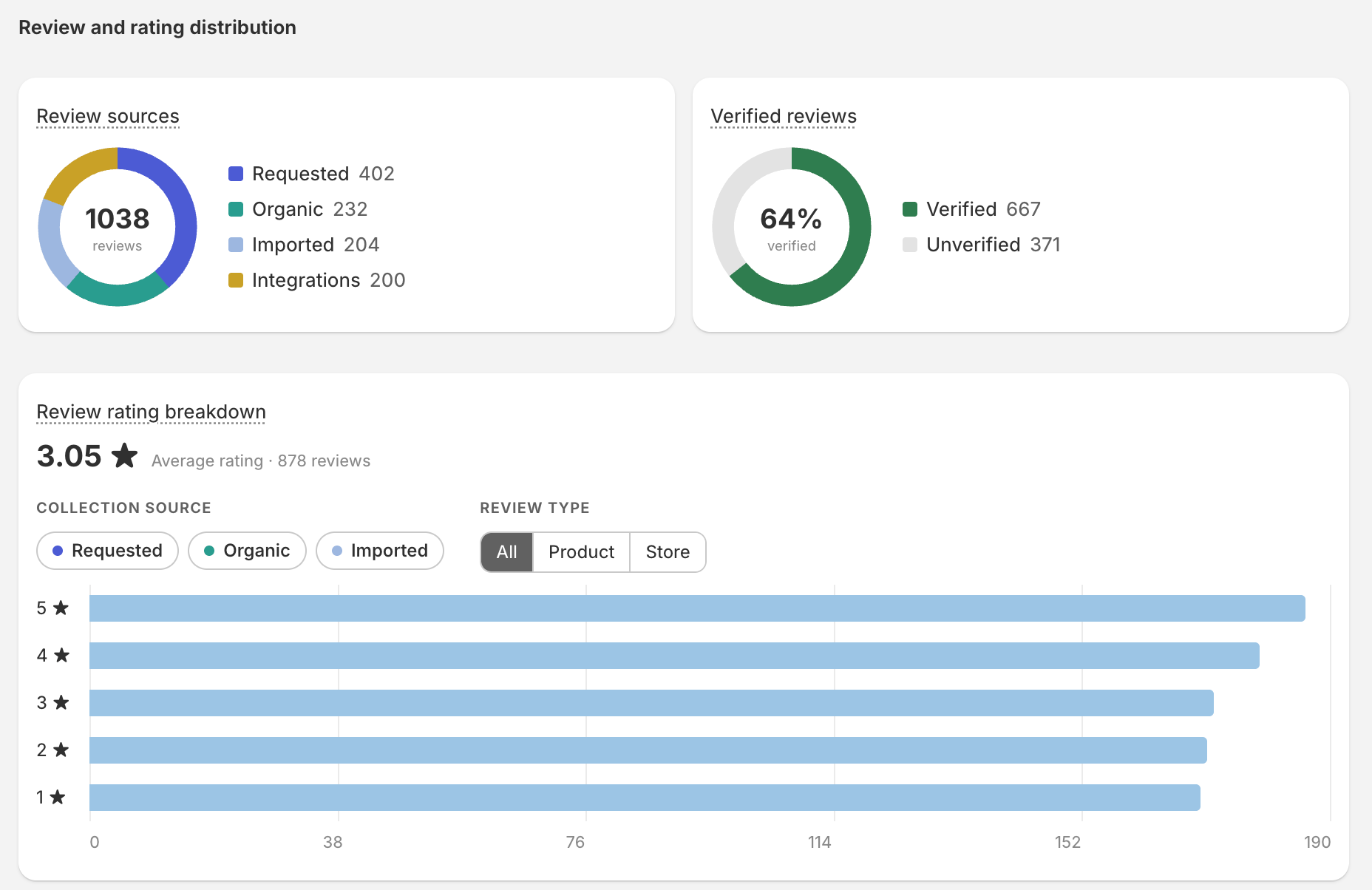
- Review sources: Requested (from automatic and manual requests), Organic (from the storefront form), Imported, and Integrations.
- Verified reviews: the share of reviews written through a review request link, which proves a purchase. See Verified buyers.
- Review rating breakdown: published reviews by star, with the average. Use the Collection source chips (Requested, Organic, Imported) and Review type (All, Product, Store) to narrow it.
The two donuts count reviews of every status. The rating breakdown counts published reviews only.
Revenue
The Revenue tab shows orders that came from a review request:
- Revenue generated by Sofcy, net of refunds and edits, per currency.
- Orders generated by Sofcy, the number of those orders.
- Recent orders generated by Sofcy, the latest ten.
How an order is counted
- A customer clicks the link in a review request email.
- They land on your store, where the Sofcy Reviews app embed (or a Review widget or Write a review block) tags their cart.
- They place and pay for an order while the link is still valid. Request links last 30 days.
Each request can be credited with one order at most. If the app embed is off, nothing is counted.
Export report
Export report downloads a CSV for the chosen period with four columns: section, metric, value and detail. It covers the summary figures, rating distribution, collection sources, attributed revenue and orders, and your top ten products.
Store category
Analytics may ask you to Tell us your store category. Choosing one saves it for future comparisons with similar stores. No comparison is shown yet. You can also set it in Advanced settings.